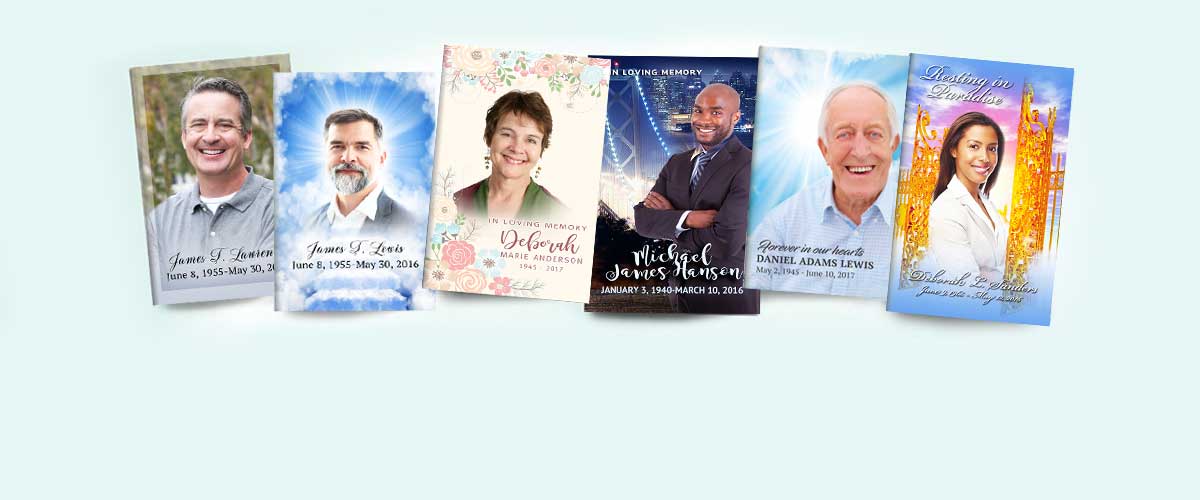
Can I Make My Own Custom Funeral Programs?

Planning a funeral or memorial service is an emotional process, filled with decisions both large and small. Among these, one of the most meaningful and lasting tributes you can create is the funeral program. Often distributed at the service or mailed to loved ones who cannot attend, the funeral program serves as both a guide and a keepsake. It tells the story of a life, outlines the order of service, and includes cherished photographs, scripture, poems, or personal messages. But many families wonder: Can I make my own custom funeral programs?
The answer is yes—absolutely. With modern tools and templates, anyone can create a beautifully personalized funeral program without hiring a designer. Today’s technology, including artificial intelligence (AI) and drag-and-drop editing platforms, makes it easier than ever to create thoughtful, professional programs from home. Whether you’re working on a tight timeline or simply want to have full creative control over this important memento, you can absolutely make your own custom funeral programs that reflect the unique life and personality of your loved one.
In this guide, we’ll walk you through how to create your own program step-by-step, highlight the tools available to help, and introduce trusted resources like The Funeral Program Site that offer templates, design support, and printing services.
Why Personalize a Funeral Program?
A funeral program isn’t just a schedule of events—it’s a reflection of the person being remembered. Customizing your program allows you to incorporate:
-
Personal photographs
-
Favorite quotes or scripture
-
Family-written tributes or poems
-
Unique color schemes or design elements
-
Cultural or spiritual symbols
By making your own custom funeral programs, you ensure that every detail aligns with your loved one’s memory, your family's tone, and the service’s purpose. It's a powerful way to connect mourners and preserve memories.
What Is Typically Included in a Funeral Program?
While programs can vary in length and format, most include the following elements:
-
Cover Page: Name, photo, birth and death dates, and a title (e.g., “In Loving Memory”).
-
Order of Service: A timeline of the ceremony, including prayers, music, readings, and speakers.
-
Obituary or Life Tribute: A short biography that tells the story of the person’s life.
-
Poems, Scriptures, or Quotes: Sentiments that reflect faith, character, or emotion.
-
Acknowledgments: A thank-you section to recognize pallbearers, clergy, or supporters.
-
Photo Collage: Optional additional images across a multi-page program.
With the right layout and design tools, these components can come together in a program that is both functional and beautiful.
Step-by-Step: How to Make Your Own Custom Funeral Program
1. Choose a Template or Platform
Start by selecting a layout that suits your needs. Bifold programs are most common (a single sheet folded in half), but you can also create trifold, gatefold, or graduated-style programs.
You can find pre-designed templates compatible with Word, Publisher, and Canva from The Funeral Program Site. These templates come pre-formatted, so you simply replace placeholder text and images with your own.
Explore template options for custom funeral programs to get started quickly with styles suited for religious, military, modern, or themed services.
2. Gather Your Materials
Have these ready before editing your template:
-
A high-resolution photo of the deceased
-
Basic biographical information
-
A list of service participants (officiant, readers, musicians)
-
Any special messages, quotes, or verses
-
Names of family members or groups to be acknowledged
The more prepared you are, the easier it will be to plug content into your chosen template.
3. Use AI Tools to Assist
If you're struggling to write parts of the program, such as a tribute, poem, or obituary, you can use AI writing assistants like ChatGPT. Here are some examples of prompts you can use:
-
“Write a short obituary for a loving grandmother who enjoyed baking and gardening.”
-
“Generate a non-religious tribute for a best friend’s funeral program.”
-
“Suggest a Bible verse about peace and eternal rest.”
AI-generated content can provide a meaningful foundation that you can personalize with your voice and memories. It’s a helpful tool, especially when writing during grief.
4. Insert Text and Images into Your Template
Using your template editor (Word, Canva, Publisher, etc.), start replacing placeholder content. Here are some formatting tips:
-
Keep text blocks balanced and easy to read
-
Use headings to break up sections
-
Choose 2–3 fonts max for readability
-
Maintain consistent margins and spacing
-
Ensure photo quality is clear and appropriately sized
Preview your design frequently to catch any layout issues early.
5. Print or Share the Final Program
Once your custom funeral program is complete, you have several options:
-
Print at home: Use a quality inkjet or laser printer and heavy paper or cardstock.
-
Use a print shop: Local or online printers can produce professional results on short notice.
-
Order from The Funeral Program Site: They offer full-service printing with fast delivery, including folding and finishing.
-
Distribute digitally: For virtual memorials or distant friends, share the program as a PDF via email or messaging.
Save both an editable version (in case you need to revise) and a print-ready PDF.
Benefits of Making Your Own Custom Funeral Programs
Creating your own funeral program has many advantages:
-
Creative control: You decide what goes in and how it looks.
-
Cost savings: DIY design is often more affordable than hiring a designer.
-
Personalization: No one knows your loved one like you do.
-
Quick turnaround: AI and templates allow you to finish in hours, not days.
-
Emotional expression: It’s a way to channel grief into something meaningful.
It’s not just about saving money—it’s about creating something you can be proud of and that others will treasure.
Resources That Can Help
When working on custom funeral materials, it helps to have reliable tools and examples. Here are a few resources worth exploring:
-
The Funeral Program Site – A leading provider of funeral program templates, printing, and design services. They offer bifold, trifold, and other styles with matching prayer cards and bookmarks.
-
Canva – A free graphic design tool with drag-and-drop editing. Great for beginners using prebuilt layouts.
-
Microsoft Word or Publisher – Best for those familiar with Office products.
-
Google Docs/Slides – Good for collaborative editing with family members.
-
AI Writing Tools – Like ChatGPT, Jasper, or Grammarly for writing support.
Combining the personalization of these tools with ready-to-edit templates allows you to create unique, heartfelt programs quickly.
Sample Ideas for Your Program’s Content
If you're unsure what to include in your program, here are a few inspiring ideas:
-
A quote like: “What we once enjoyed and deeply loved we can never lose.” – Helen Keller
-
A favorite song lyric or hymn line
-
A timeline of key life events
-
A list of the person’s favorite things (foods, hobbies, sayings)
-
A thank-you message to attendees for their support
Each small addition helps paint a more complete picture of your loved one’s life and spirit.
Final Thoughts
Creating your own custom funeral programs is not only possible—it’s empowering. It allows you to celebrate your loved one’s life with words, images, and designs that feel authentic and personal. With user-friendly templates, AI-assisted writing, and digital editing tools, the process is accessible even for those with no prior design experience.
Whether you prefer to print at home, use a local shop, or place an order through The Funeral Program Site, the result will be something that mourners can hold, keep, and remember.
During a time when everything feels uncertain, making something meaningful with your own hands is a quiet act of love. And that, above all, is what a funeral program should be—a lasting reflection of someone deeply loved and never forgotten.