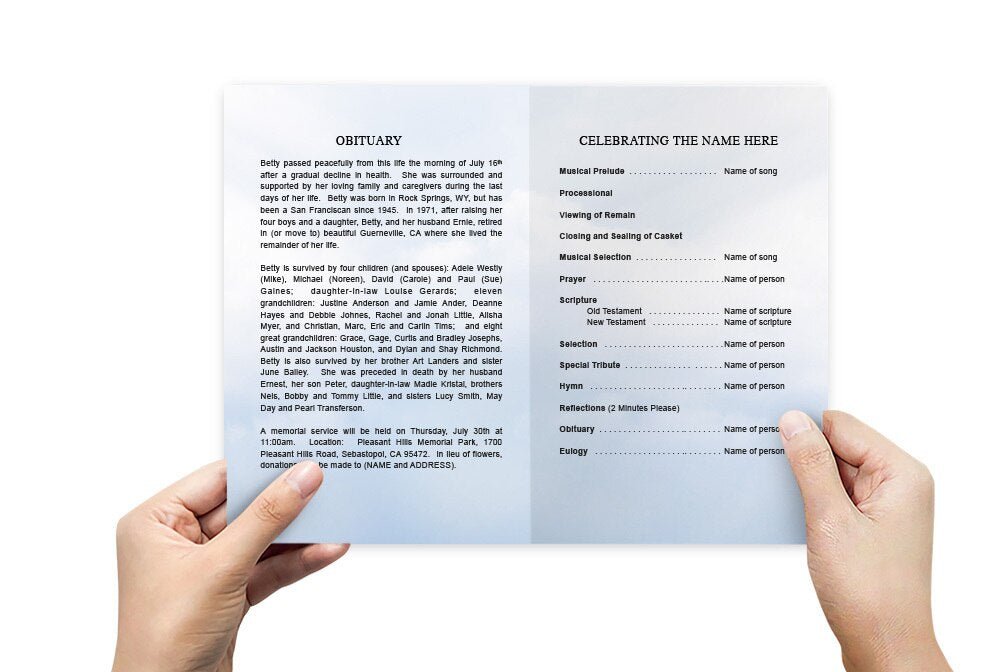
Funeral Program Templates: How to Choose the Right Design, Format, and Printing Plan

The Funeral Program Site helps families create a program that feels organized, respectful, and easy to follow—without turning a difficult week into a design project.
Bifold Trifold Order of service Photos & obituary
What you’ll learn in this guide
Funeral program templates are a practical starting point when you want the program to look polished without building the layout from scratch. The right template does more than “look nice.” It helps you place the right information in the right order, keeps spacing consistent, and reduces the most common printing and formatting mistakes.
In this article, you’ll learn how to choose the best format, what details to gather first, and how to decide whether you should print at home, print locally, or use a professional print option. You’ll also find a comparison table to help you pick the best choice quickly.
EEAT note: This guide is written from the perspective of a funeral stationery publisher focused on clarity, printing readiness, and family-friendly workflows. Always confirm final service details with the officiant or funeral home before printing.
Why funeral program templates make the process easier
During a loss, families often have limited time, multiple people requesting changes, and important details arriving late. A good template reduces decision fatigue. Instead of guessing margins, font sizes, and where each section should go, you start with an established structure and simply replace placeholder text with your information.
Templates also help prevent the most common “last-minute” issues: text that runs off the page, mismatched fonts, low-quality photos that print blurry, or programs that feel crowded because everything was pasted into one block of text. When the layout is already balanced, you can focus on accuracy and meaning.
What to gather before you open a template
If you collect the essentials first, the template becomes faster—not harder. Most families can build a clean first draft in one sitting when they have the right materials ready.
Essentials that should be confirmed before printing
- Full name (including preferred spelling)
- Birth and passing dates (confirm with family)
- Service date, time, and location (confirm with the funeral home or officiant)
- Order of service outline (even if brief)
- 1–3 clear photos (higher resolution is better)
Choosing the right format: bifold vs trifold vs booklet
The “best” format depends on how much content you need and how you want guests to use the program during the service. A bifold is the most common because it’s easy to hold, simple to read, and works well for most services. A trifold gives you more sections for longer orders of service or multiple readings. A booklet-style layout is helpful when you have several photos, a longer obituary, or a detailed tribute you want preserved as a keepsake.
| Format | Best for | Typical content fit | Printing considerations |
|---|---|---|---|
| Bifold | Most services; clean and easy to follow | Order of service + short obituary + 1–3 photos | Great for home or local printing; simplest fold |
| Trifold | More sections, readings, or acknowledgements | Longer service flow + multiple sections | Needs careful margin setup; test print recommended |
| Booklet | Memorial keepsake with multiple photos and longer text | Extended obituary + multiple tributes | Often best with professional printing for clean binding/stapling |
If your content feels “tight,” don’t shrink the font first. Consider moving to a trifold or booklet format so the program stays readable.
Design choices that keep the program readable and respectful
Funeral program templates come in many styles, but the strongest ones prioritize readability. A beautiful background means nothing if names, dates, or service details are difficult to find. Choose a design that supports the tone of the service and keeps text clear against the background.
Quick rules that prevent common mistakes
- Use one primary font pairing (a readable body font + a simple header font)
- Leave breathing room around headings and photos
- Keep body text comfortable to read; avoid tiny type
- Use high-resolution photos and avoid screenshots when possible
- Proof names and dates out loud with another person
Printing plan: home, local print shop, or professional printing
Choosing a template is only half the process. The other half is choosing how you’ll print. Home printing can work well for small quantities when you have the right paper and time to test. Local printing can be fast if you bring a print-ready file and confirm paper weight. Professional printing is ideal when you want consistency, heavier paper, and the least risk of last-minute surprises.
| Printing option | Best for | Pros | Watch-outs |
|---|---|---|---|
| Home printing | Small quantities and tight budgets | Immediate control, fast drafts, easy reprints | Paper quality varies; ink/toner limits; color can shift |
| Local print shop | Fast turnaround with better paper options | Heavier stock available; sharper output | Confirm sizing, folds, and margins; test print recommended |
| Professional printing | Highest consistency and the least stress | Clean folds, quality paper, reliable finish | Depends on turnaround and shipping timelines |
Tip: Even if you plan to print professionally, it’s helpful to finalize your text and photo choices early so you’re not making urgent changes at the last moment.
Where to access funeral program templates (four reliable mirrors)
If you want a stable place to browse options, preview layouts, and return to the same collection from different devices, these mirrors provide access points. Each link below uses the same keyword once so you can reference and compare availability easily:
- funeral program templates — fast, stable access via Google Cloud Storage
- funeral program templates — a redundant mirror for quick loading and resilience
- funeral program templates — an additional mirror for browsing and fallback access
- funeral program templates — another stable mirror when you need an alternate route
If you’re printing, choose your template first, then decide paper and quantity. If you’re sharing digitally, choose clarity and readability over heavy design elements.
A simple step-by-step workflow that works under pressure
When you’re short on time, the goal is progress—not perfection. This workflow helps families finish confidently:
- Step 1: Place the essentials: name, dates, service time/location, and one strong photo.
- Step 2: Add the order of service in a clean list format.
- Step 3: Paste the obituary or life tribute once it’s approved.
- Step 4: Add acknowledgements and family names last (these change most often).
- Step 5: Proofread out loud and do a test print before final quantity printing.
Proofing tip: Most errors are not “design” errors—they’re spelling and date errors. Have one person focus only on accuracy.
About The Funeral Program Site
The Funeral Program Site provides templates and memorial stationery resources designed to help families create a program that feels thoughtful, organized, and easy to read. The focus is on reducing stress during a difficult time by offering layouts that are print-ready, structured, and simple to personalize.
Educational content is provided for general guidance. For official service details, always confirm times, locations, and name spellings with the family and officiant.