What Do I Need to Create Custom Funeral Programs?

Creating a meaningful tribute for a loved one who has passed can feel overwhelming, especially in the emotional days leading up to a funeral or memorial service. Among the most important printed elements of any service is the funeral program—a document that guides guests through the ceremony while honoring the life of the deceased. Many families today are asking: What do I need to create custom funeral programs? The good news is that creating a personalized, elegant program is entirely possible with the right tools, templates, and resources.
Whether you’re designing one yourself, using a downloadable template, or working with a printing provider, this guide will walk you through what’s required to create custom funeral programs that reflect the life, values, and legacy of your loved one. With online access to resources such as The Funeral Program Site and beautifully designed templates, the process can be made both simple and meaningful.
What Are Custom Funeral Programs?
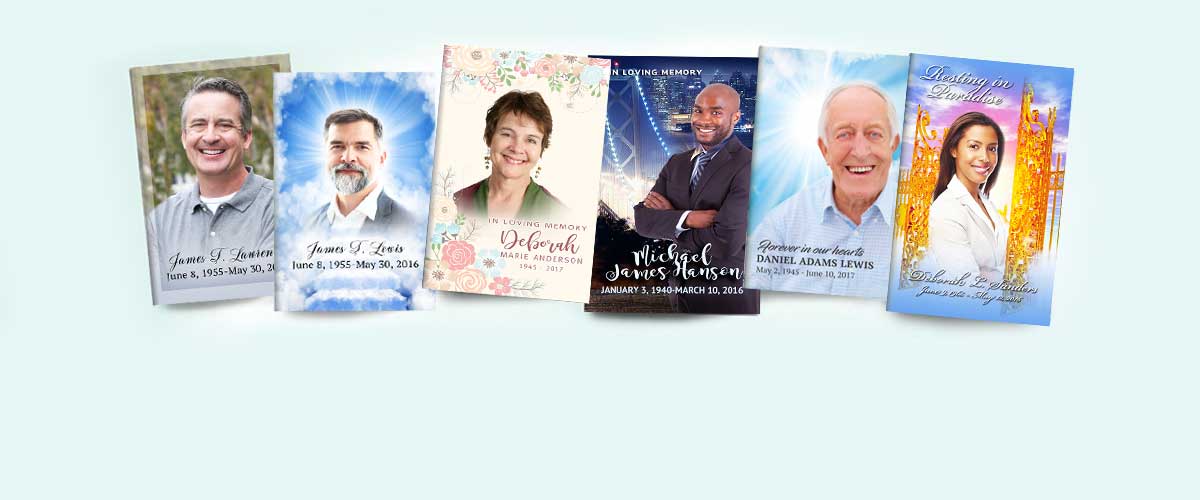
Custom funeral programs are personalized printed booklets or folded sheets distributed at funerals and memorial services. Unlike generic versions, custom funeral programs incorporate individual details such as:
-
A cover photo and full name
-
Birth and death dates
-
The order of service
-
A written obituary or life tribute
-
Selected prayers, scriptures, poems, or quotes
-
Acknowledgments and thank-you notes
-
Personal photos or collages
These programs often become cherished keepsakes, offering a tangible reminder of a loved one’s story and the impact they had on others.
Step 1: Gather the Essential Information
Before you start designing, gather the necessary content. This step will save time and ensure a smooth creative process.
You’ll need:
-
Full name of the deceased
-
Dates of birth and passing
-
Service details (time, date, location, officiants)
-
List of speakers, readers, or musicians
-
A brief biography or obituary
-
Favorite scriptures, verses, or quotes
-
Acknowledgment section for family thanks
-
Photographs (including one for the cover and others for inside)
Having this material ready will help you populate your design or template efficiently.
Step 2: Choose the Right Layout Format
There are multiple layouts available depending on how much content and imagery you plan to include. Here are the most popular formats:
-
Bifold: A single sheet folded in half, providing four panels—ideal for most services.
-
Trifold: A three-panel layout used for services with more speakers or scripture.
-
Booklet: Multi-page documents bound or stapled, used for extended tributes or photo galleries.
-
Graduated Fold or Gatefold: Creative, layered folds for modern and artistic tributes.
You can preview a range of downloadable custom funeral programs that fit each of these formats. The layouts are designed for easy editing in tools like Microsoft Word, Canva, or Adobe Express.
Step 3: Select a Template or Design Platform
Using a pre-designed template is one of the most efficient ways to create a custom funeral program. Templates provide structure, suggested text, and image placeholders—reducing your workload during a stressful time.
Popular design tools include:
-
Microsoft Word or Publisher: Ideal for those familiar with Office applications.
-
Canva: Drag-and-drop interface with dozens of templates and built-in AI support.
-
Google Docs/Slides: Good for family collaboration.
-
Adobe Express: Professional-level editing with creative flexibility.
For fast access to editable designs, explore curated custom funeral programs that can be downloaded instantly and used with your chosen software.
Step 4: Personalize the Program
This is where the emotional and creative elements come into play. Begin by adding your selected content to the template:
-
Insert the name, dates, and service location on the cover
-
Paste your obituary or tribute into the designated section
-
Add scripture, poems, or spiritual texts
-
Insert high-resolution photos of the deceased
-
Customize fonts, colors, and background design
If you find writing the obituary or tribute difficult, AI tools such as ChatGPT can help generate a first draft based on a few life details, personality traits, and accomplishments. You can then edit and personalize it to ensure authenticity.
Don’t forget to add personal touches—like a favorite quote, song lyrics, or a note from the family. These small details help transform a standard document into a meaningful memorial.
Step 5: Review and Proofread
Before printing or sharing, always take time to:
-
Proofread for typos, grammar, and accuracy
-
Verify all names and dates
-
Double-check photo placement and image quality
-
Ensure text fits within the design layout
It’s also helpful to ask another family member to review the program. A second set of eyes can catch mistakes or offer valuable suggestions.
Step 6: Print and Share the Final Program
Once everything is finalized, you have two main options: print at home or outsource to a professional service.
Home Printing
Pros:
-
Immediate turnaround
-
Full control over paper choice
-
Cost-effective if printing small quantities
Cons:
-
Limited to your printer’s capabilities
-
Requires manual folding and assembly
-
Risk of alignment or ink issues
Professional Printing
Pros:
-
High-quality results with professional paper and finishes
-
Folding and cutting included
-
Available in bulk quantities (e.g., 25, 50, 100+)
-
Can match with prayer cards, bookmarks, and other materials
Cons:
-
Slightly more expensive
-
Requires shipping time (though rush options are available)
If you need help, providers like The Funeral Program Site offer full-service printing for all types of funeral programs. You can choose to upload your design or have their team customize the layout for you. They also offer matching accessories such as prayer cards, memorial bookmarks, thank-you cards, and sign-in books.
Use AI and Templates to Save Time and Stress
Technology can be incredibly helpful when you're working under pressure and emotional strain. Here’s how AI and templates lighten the load:
-
Obituary Writing: AI can create polished, heartfelt tributes based on a few life facts.
-
Design Suggestions: Canva’s AI suggests font pairings and color palettes.
-
Content Layout: Templates guide you on what information to include and where to place it.
-
Quick Customization: Drop in your text and photos with minimal effort.
Templates that support AI tools make the process even faster. For a ready-to-edit example that integrates seamlessly with Canva and other platforms, visit custom funeral programs.
Why Choose The Funeral Program Site?
If you’re seeking peace of mind and professional results, The Funeral Program Site stands out as one of the most reliable sources for funeral stationery. With decades of experience, they understand how to combine compassion with quality and efficiency.
Their advantages include:
-
Extensive design options across cultural, religious, and lifestyle themes
-
Editable downloads for Microsoft Word, Publisher, and Canva
-
Custom design services if you need help personalizing
-
Rush printing and shipping across the U.S.
-
Helpful customer support during difficult times
Whether you’re preparing days in advance or need same-day service, The Funeral Program Site offers solutions for every family and every budget.
Frequently Asked Questions
How many programs should I print?
A general rule is to print one program per guest, plus 10–15 extras for keepsakes and mailing.
Can I share the program digitally?
Yes. Export your file as a PDF to email or post online for friends and family who cannot attend.
What’s the best paper to use?
For a professional feel, use 32 lb. matte or glossy brochure paper. For premium booklets, consider 100 lb. silk or satin finish.
Can I print black-and-white versions to save money?
Yes, though color adds warmth and enhances photographs. Black-and-white programs are still a respectful and elegant option.
Is it okay to include humor or lighthearted content?
Absolutely. A custom funeral program should reflect the person’s personality. Uplifting stories and moments of humor can bring comfort and balance.
Final Thoughts
Creating custom funeral programs isn’t just about designing a document—it’s about preserving a legacy, comforting mourners, and expressing love through thoughtful detail. With the right templates, tools, and providers, you can create a tribute that captures the essence of your loved one in a lasting way.
Whether you prefer to design it yourself using AI-supported layouts or want professional assistance, options like The Funeral Program Site, Celebrate Prints, and downloadable design resources ensure the process is manageable and meaningful.
From your heart to theirs, every photo, word, and color in your custom program becomes part of a beautiful goodbye—and a lasting reminder of a life well lived.